Attaching a referral
A study cannot be allocated to a radiologist until a referral is attached. The referral tells the radiologist who requested the study and why.
Finding studies that need a referral
In All Studies, look for the referral icon in the study's row — it indicates that no referral has been attached yet.
 The referral icon — click it to attach a referral to that study.
Attaching the referral
- Click the referral icon on the study's row.
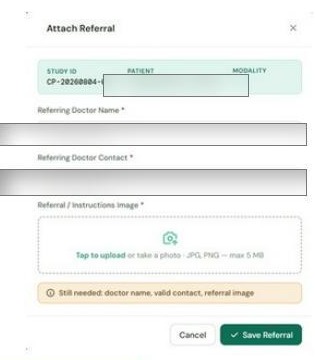
- Enter the Referring Doctor's name.
- Enter the Referring Doctor's contact number (10 or 12 digits).
- Attach the referral / instructions image — a photo or scan of the physical referral slip.
- Click Save.
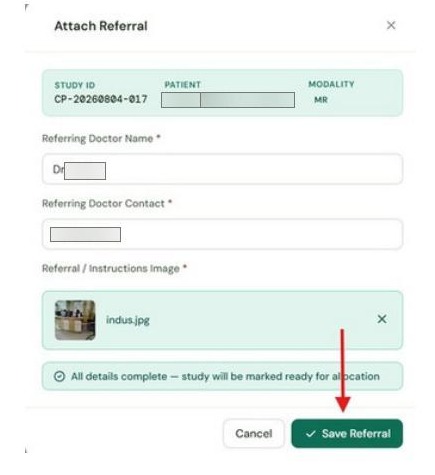 Enter the referring doctor's details and attach the referral image.
Once saved, the study's status changes to Awaiting Allocation and the Administrator can now allocate it to a radiologist.
A clear photo taken with a phone is fine. The image just needs to be legible for the radiologist — JPG or PNG, under 5 MB.
After the referral is attached
The study moves to Awaiting Allocation status. The Administrator will allocate it to a radiologist. Once the radiologist submits their report, it will appear as Completed in your All Studies list and will be available for download.